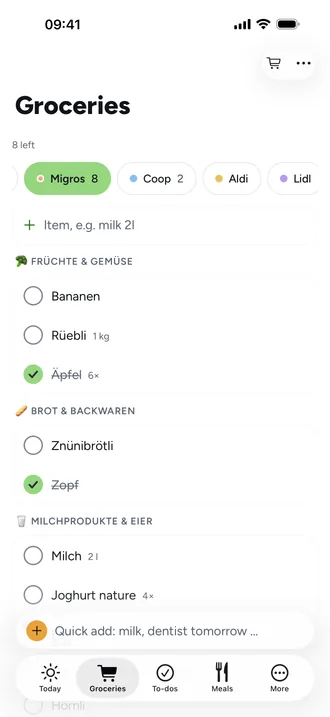
Shared grocery list: sorted the way you walk through the store
A shared grocery list is the reason many families look for an app at all. To help in the store it needs to do more than a note: know which store you're in and the order you walk through it.
One list per store
Every grocery list in Beeside belongs to a store, each with its own colour. So the detergent doesn't end up on the list for the bakery.
Sorted by your route
You order aisles like “Fruit & veg” per store in the order you walk. Anything a store doesn't have, you take out. Beeside remembers which aisle an item belongs to.
Quick to add, instantly shared
- Beeside picks up amounts like “milk 2l” or “mince 500g” as you type.
- Ticked items show up for everyone right away and move to the bottom.
- Ingredients from the weekly meal plan go on the list with one tap, duplicates added up.
- No signal in the store? Ticking off works offline and syncs later.
Frequently asked questions
Does everyone in the family see the same list?
Yes. What one person adds or ticks off appears for everyone else, on iPhone, Android and the web.
Can I keep lists for several stores?
Yes, as many as you like, each with its own colour and its own route through the aisles.
Does the list work without signal?
Yes. You can add and tick off offline, and Beeside syncs as soon as you're connected again.