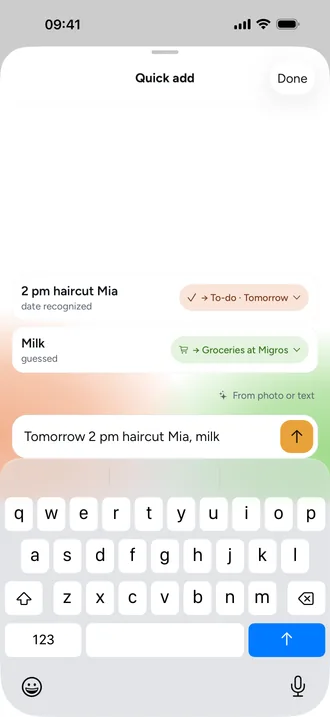
Quick add: just type, Beeside sorts it
The honey “+” in the middle of the bar opens Quick add; on the web it's the + Quick add button. Just start typing, for example “Milk 2l, bread, Friday 2 pm haircut Mia”.
- Tap +.
- Type several items separated by commas. Decimals like “1.5 kg” stay together.
- Under Recognized items, each item shows where it goes, such as “Groceries at Migros” or “Calendar”, and why: “known item”, “looks like an event”.
- If a destination is wrong, tap the chip and choose another.
- Tap Add.
What Beeside recognises
- Groceries: items you've bought before, and anything with a quantity like “Mince 500g”.
- Calendar: a date with a time, or words like “dentist” and “parents' evening”. Names from your family become the people on the event.
- To-dos: tasks like “call the dentist” or “fix the bike”, with a date as the due date.
- Inbox: anything Beeside can't sort for sure ends up here. Under More › Inbox you give it a home later.
From photo or text
With From photo or text, Beeside reads a school letter, an invitation or a timetable and turns it into drafts. Only what you add gets saved. On iPhone, text is read by Apple's on-device model where available, otherwise by the server. Photos always go via the server; private entries never do.