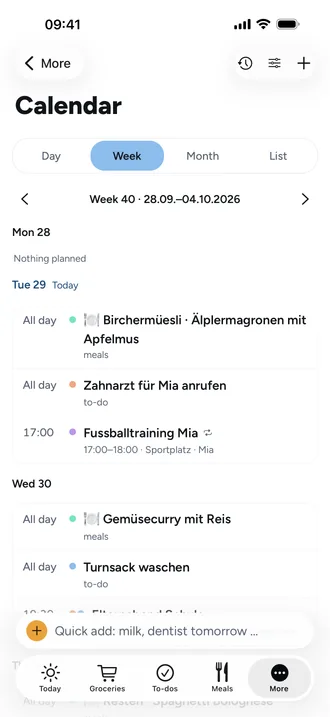
Shared family calendar: one calendar where everyone sees their own events
A shared calendar only helps if you can quickly see what concerns you. Otherwise your own events get lost between swimming practice, parents' evening and everyone else's dentist.
Events for specific people
In Beeside you choose under For whom who each event concerns. It shows up in their colours. If you pick nobody, it's for the whole family.
Only the people concerned get reminded
The reminder, say 1 hour before, goes only to the people you chose. So the kids don't get mum and dad's dentist appointment on their phones. A private event is seen and reminded only to the person who created it.
Views and repeats
- Day, week, month or list, coloured by person.
- Repeat daily, weekly on chosen days, monthly or yearly; single events in a series can be changed.
- Birthdays and occasions appear in the calendar, and due to-dos and the meal plan if you like.
- In the app, Beeside also shows your phone's calendars (iCloud, Google, Outlook) alongside, on that device only.
Subscribe in Apple, Google or Outlook
If you'd rather check your phone's calendar, subscribe to Beeside with a link: for the whole family or just your own events. Your calendar app fetches changes on its own.
Frequently asked questions
Does everyone get notified about every event?
No. Only the people chosen for the event are reminded, or everyone if nobody is chosen. Private events only remind their creator.
Can I see Beeside in my iPhone calendar?
Yes. Under calendar settings you create a feed link and add it in Apple, Google or Outlook.
Will school holidays show up in the calendar?
We're working on it: school holidays and public holidays for all 26 Swiss cantons, Germany and Austria.