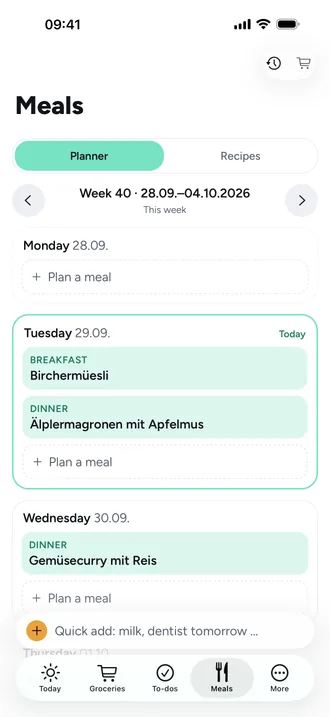
Plan the week's meals and add ingredients to the list
Plan a meal
- Open Meals › Planner. Use the arrows to move between weeks.
- Tap Plan a meal on a day.
- Choose the Meal: Breakfast, Lunch, Dinner or Snacks.
- Choose Recipe and search for one, or Free text for “Leftovers” or “Dinner at Grandma's”.
- For a recipe, set the servings under For, in half steps.
Tap an entry to change it. Swipe left to remove it, with undo.
Ingredients to the grocery list
- Below the week plan, tap Add ingredients to grocery list; on the web, Ingredients.
- Choose the Days. Today and the coming days of the week are selected.
- Untick what you already have: “Uncheck what you have”.
- Choose the store and tap Add to grocery list.
What Beeside works out
- Each recipe is scaled to the planned servings.
- Identical ingredients are combined, even across units: grams and kilos, millilitres and litres.
- If an item is already on the list, the amount is added instead of it appearing twice.